TAXATION MANAGEMENT USING ASYCUDA++
Ó UNCTAD - SITE (V1.15)
A.27
AskTax(..)
Logic
User input of some or all of the Tax data.
Syntax:
Action is AskTax(“Tax code”,”MP”,Tax Base, Tax Rate,Tax). Note: use
of ‘-1’ in place of base, rate or tax allows user input.
Purpose:
This function may be used in MODCHQ or MODCHQCF to allow the
details of a complex tax to be manually input.
The AskTax function is used at the Item level or for Global taxes. Up to 3
manual taxes can be created for Global taxes.
Example:
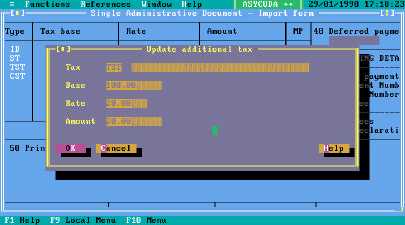
AskTax("TXC", "1", -1 , -1 , -1 ). This action will open a window for the
manual input of the tax base, rate and calculated tax.
Note: To input just the base and/or rate and have the system do the
calculation, follow the AskTax with an UpdTax statement, described
below, to recalculate the tax amount using the details from the AskTax.
This is the input window generated by an AskTax statement
Figure A.13: MODCBR: Declaration input
Dotax(..)
Logic
To calculate tax.
Syntax:
Action is DoTax(“Tax code”,”MOP”,Tax Base, Tax Rate,Tax)
Purpose:
Calculates, charges and displays the tax.
Example:
DoTax("ICD", "1", Statval , 10 , Statval * 10/100).
This action will calculate and display the tax ICD, to be paid (MP 1), tax basis
is StatVal, rate is 10%, tax is 10% of StatVal.
Note: If a tax has already been calculated and a "Dotax" is requested for
the same tax code, the Dotax function recalculates it.