MODCHQ - SET UP AND MAINTENANCE
Ó UNCTAD – SITE (V1.15)
10.9
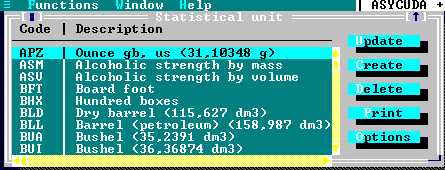
Fig. 10.6 MODCHQ : Functions: Database Management: Customs Tariff: Tariff Components: Statistical Units
Wherever possible the statistical unit codes, and the descriptions in the table of
the units of measurement, should conform to international standards. See the
UN Trade Data Elements Directory for guidance.
Market Value
This option allows the setting up of a system to allow the user to either monitor valuation or to
nominate a set value as the tax base. By setting up the market value under this option the System
calculates a market value from the declaration data and displays this calculated value on the
screen within the 'Item Valuation Note' window. This ‘Market Value’ is linked to the Commodity
Code so this value can also be used in tax calculation.
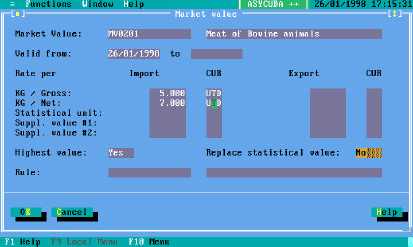
The Market Value is set up by defining an import and/or export value against one or all of the
statistical units or a unit already captured on the declaration, for example, $500 per tonne or $10 for
each Supplementary Unit of quantity. For more complex calculations, the Market Value window has
the option of inserting a Rule. This is written in MODCHQ using the sub-menu option 'Rule'.
The Use HIGHEST VALUE box.
This field will accept either ‘YES’ or ‘NO’. If ‘YES’ the system will calculate the highest calculated
value from the mass or statistical units defined, if ‘NO’ the system will use Gross Mass.
The Replace Statistical Value box.
If this is ‘YES’, the declared statistical value will be replaced by the calculated market value.
Fig. 10. 7
MODCHQ : Functions:
Database management:
Customs tariff:
Tariff components:
Market Value: Update