MODCHQ - SET UP AND MAINTENANCE
Ó UNCTAD – SITE (V1.15)
10.10
Rule
If a Rule is inserted in this box the system will ignore any Market Value defined in the Market Value
record and expects the Statistical or Customs value to be defined in the rule. (‘Rules’ are described
on page 12.)
The "CustValue" variable
Within the System the result of a market value calculation is written to the variable 'CustValue'. If
no ‘Market Value’ is defined for the Commodity then ‘CustValue’ has the same value as ‘StatVal’.
If the ‘Replace Statistical Value’ box is ‘YES’ then the declaration Statistical value will be reset to
the calculated Market value. Tax calculations are usually defined in MODCHQCF (see Section 08
for details) and are normally written to charge Duties and Taxes on the Statistical Value or
‘StatVal’, but where ‘Replace Statistical Value’ is set to ‘YES’ this will cause the Duties and
Taxes to be charged on the calculated Market Value.
Using a Market Value
To use a 'Market Value' in a tax calculation requires the following steps:
1. ‘Market Value’ is defined for the Commodity specifying unit values;
2. The Replace Statistical Value is set to ‘YES’ and
3. The name of the 'Market Value' to be inserted in the Market Value box within
the Commodity Code update window.
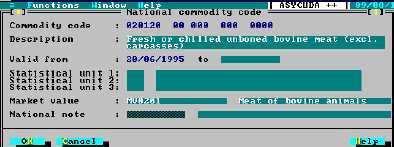
This example shows a ‘Market Value’ called “MV0201” inserted Commodity Code 020120.
Fig. 10.8 MODCHQ : Functions: Database management: Customs tariff: Commodity code: Update
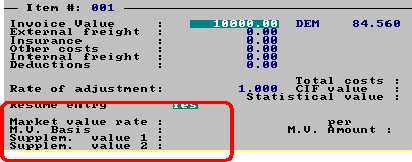
To the user entering a Customs declaration in the Customs or Declarant Office, the existence of a
Market Value is shown within the ‘Valuation Note’. (For an explanation of ‘Valuation Note’ within
declarations, see Section 3, ‘Customs Declarations’ ).
Fig. 10.9 MODCBR: Functions: Declaration: Amendment: F9 Local menu: Quadrants: Valuation note
General Note
This option allows the definition of a rate that has general application throughout the Tariff.