MODCHQ - SET UP AND MAINTENANCE
Ó UNCTAD – SITE (V1.15)
10.11
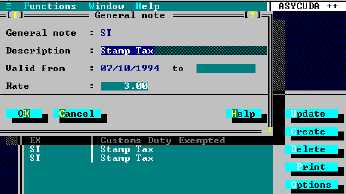
Fig. 10.10 MODCHQ : Functions: Database Management: Customs Tariff: Tariff Components: General Note
The action of setting up a General note is quite simple. The General Note is defined and the
effective duty rate entered in the ‘Rate’ field.
A duty or tax rate does not have to prevail throughout the Tariff to make a General note worthwhile,
as long as it is a common rate that is always amended at the same time whenever it applies. To
change a rate is very simple, as it requires only the relevant General note to be amended to the
new rate.
Quotas
This option allows the capture of codes and descriptions of Quotas to be entered in box 39 of the
SAD. Control over the quota option is activated by setting the flag in MODCHQCF ‘Declaration
Standards’ to ‘Yes’ . If the quota control is set to ‘No’ quota codes can still be entered, but will not
be subject to any system validation.
Taxation
The sub-options allow rules to be defined and these rules can be used to modify the duties and
taxes calculated and attached document codes. Extra Tariff columns above the normal maximum
of 15 can be defined by using ‘Additional Column Rates’. Lists of commodity codes can be
defined for use within rules.
An example of the use of a General note is as follows:
If, for example, VAT is always payable at 2% throughout the Tariff, it is much
more efficient to represent this tax formula as a general note, and apply that
general note code to the Tariff.
When a VAT rate has to be changed, for example, VAT was to increase to
2.5%; ‘direct keyed’ rates would all require amendment. Even using the
simplified update facilities this would be time consuming.
If the 2% rate of VAT is held as a General note, however, only the General note
information itself needs to be amended to effect the change throughout the
Tariff.