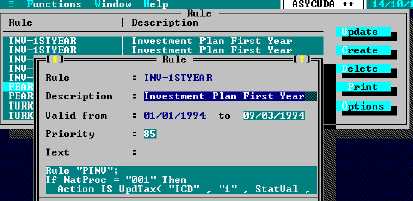
MODCHQ - SET UP AND MAINTENANCE
Ó UNCTAD – SITE (V1.15)
10.12
Rule
Fig. 10.11 MODCHQ : Functions: Database Management: Customs Tariff: Rule
These rules can be inserted in one of the following places to effect the taxation changes in the
circumstances defined in the rule.
·
The Additional Code for the Customs Procedure Codes;
·
The Commodity Code;
·
The Agreement Code;
·
The Country Code;
·
The Preference Code;
·
The Market Value.
The rules are ‘inserted’ by going to that table, ‘Functions’, ‘Database Management’, opening the
screen and selecting ‘Update’. The code name of the new rule is inserted in the ‘Rule’ field.
The table of Rules, with names, is available by using <F8> .
Explanation:
In this case the rule tests if the goods are imports.
If TypProc = "4" Then
If the TypProc is ‘4’ (the procedure code for imports) then the next line of the rule is processed, i.e.
Action IS DoTax( "EXC", "1", SuppUnits, 10, SuppUnits * 10 );
This line uses the ASYCUDA Rules function DoTax( ) to calculate the tax payable. Here the tax is
Excise duty, code "EXC"; the duty is payable, (the code for payable is "1"), the tax base is the
Supplementary Unit SuppUnits, the rate of tax is 10 and the tax is calculated as Supplementary
Units x 10 - SuppUnits * 10.
If TypProc is not '4' the Action IS DoTax( ) line is not processed and no Excise duty is charged.
See Section 8 of this Reference Document for ‘Mode of Payment’ codes.
Here is an example of a rule that charges excise duty -
Example 1:
Rule "EXCISE";
If TypProc = "4" Then
Action IS DoTax("EXC","1",SuppUnits,10,SuppUnits * 10);
Endif;