MODCHQ - SET UP AND MAINTENANCE
Ó UNCTAD – SITE (V1.15)
10.22
Operational Environment
Under this option the following tables can be maintained.
1. Customs Office;
2. Transit shed;
3. Customs Warehouse;
4. Examining Officer;
5. Declarant;
6. Carrier;
7. Company;
8. Bank.
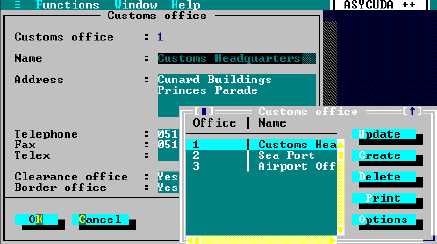
The method of updating these tables is identical. The Customs Office is shown as an example.
Fig. 10.16 MODCHQ: Functions: Database Management: Operational Environment: Customs Office
When a table contains coded information from another table, e.g. Customs Offices with Modes of
Transport, then these linked codes must already exist in the appropriate table.
Not all fields of the table update screens may be visible without activating the
scroll bars and moving to the bottom of the form e.g. the field that displays links
between office and modes of transport is not visible. To complete a new record
you need to first ‘Create’ then ‘Update’. See Preferences for details.
Transaction Controls
Under this option the following tables can be maintained.
1. Budget;
2. Tax;
3. Attached Document;
4. Processing Program;
5. Accounting Transaction;
6. Country;
7. Currency.