MODCHQ - SET UP AND MAINTENANCE
Ó UNCTAD – SITE (V1.15)
10.25
Any new codes are created and descriptions updated in a similar manner to that previously
described.
International Trade Terms, as the name suggests, are in most cases strictly
defined. Codes and descriptions are to the standards set out in the United
Nations Trade Data Elements Directory. It is strongly recommendation that
countries adopt the international coding standard, regardless of their language
choice for the national ASYCUDA++ system interface.
Simplified Management
Under this menu option, Currency rates and the Tariff can be easily updated.
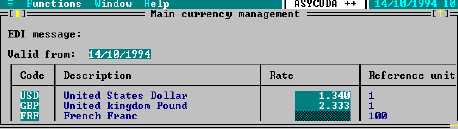
Exchange Rates
Using this option it is easy to change the exchange rates for currencies.
Fig. 10.19 MODCHQ: Functions: Database Management: Simplified Management: Rates of Exchange
The currencies concerned and their rates and reference units can be updated on a single screen.
The system then updates the complete table in one step. See page 23 of this Section for an
explanation of the purpose of the currency ‘Reference Unit’.
Currency codes and conversion rates are input as a single list. On completing the list of required
changes or updates, the list details are transferred into the currency control table by selecting <F2>
or 'Validate' from the ‘Local Menu’, 'Action'.
Regular updating of a range of country currencies can be further facilitated by the saving of your list
as a file, through the Local Menu, in EDI format. This means that the saved currency (EDI) file can
be retrieved and only those currencies where the rates have altered need be updated for further
transfer to the currency control file.
Customs Tariff
Otherwise called ‘Simplified Update’.
Using this option a range of commodity codes can be updated as a block, with taxation rates or the
inclusion of Statistical units, Market values, National notes and Rules.