MODCHQ - SET UP AND MAINTENANCE
Ó UNCTAD – SITE (V1.15)
10.6
Database Management
This option is used to maintain all the tables including all the codes and the tariff. It is the option
that will be extensively used when you set up your system.
Customs Tariff
The first sub menu option, ‘Customs Tariff,’ deals with all aspects of tariff maintenance. It allows
the modification of the Commodity Code descriptions, National Notes, the definition of Commodity
Codes at national level, the insertion of rates against Commodity Codes and the management of
tables listing Preferences, Statistical Units, Market Values and General Notes.
Sections, Chapters and Headings
The first 4 sub-options deal with the description and notes on the different parts of the Tariff. These
options follow the formal structure of the Harmonized System tariff.
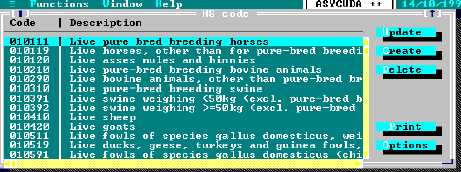
Fig. 10.2 ‘MODCHQ: Functions: Database Management: Customs Tariff: HS Codes’
The screen above relates to the Harmonized System tariff code, (HS Code), but all of these sub
options are broadly similar. The description and notes can be amended for all of the tariff divisions,
chapters, headings and HS Codes.
A sub chapter and subheading option exists. The relevant level can be amended, created, or
deleted.
Note: As the System comes pre-loaded with the standard Harmonized Tariff,
changes at this level would usually be restricted to descriptions, for translation to
other languages at initial installation and set up.
National Notes
The 5th sub option ‘National notes’ allows the definition of National Notes that can be added at
Tariff Section and Chapter level. National notes at the HS level are used to expand on or to explain
HS interpretation in a National context.