FINDING YOUR WAY AROUND ASYCUDA++
Ó UNCTAD - SITE (V1.15)
2.18
Communications
Allows users to say what network server they wish to connect to.
Note: in normal operations, users in an office or region would need only to
connect to the one ASYCUDA++ network server. This would be set on their
'client' PC when the system is first installed and configured.
Where a user has access rights to more than one server, the connection is selected from the sub-
menu option: 'Server List'. (The list of available connection options is built through 'Edit Script'.)
'Edit script' opens the 'Message Handler resource screen' and allows the input of the network
address of any alternative server and says where the matching reference files are stored on the
Client PC.
The Communications menu option ‘Infos’ gives technical information on the
network configuration of the client PC. It shows which server is currently
configured for the client and gives the internet (i.e. network) address of the
client. See the technical documentation for further details.
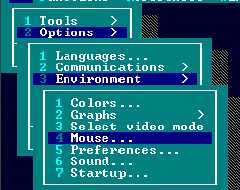
Environment
Allows users to choose aspects of screen appearance, and operation of controls. This includes: -
·
Colours (screen colour schemes);
·
Text sizes (subject to hardware capabilities);
·
Mouse speed;
·
Date format;
·
Screen saver designs;
·
Memory display on the bottom status line;
·
Screen saver delay time;
·
Background design;
·
Sound controls;
·
Start up with hierarchical menus or login window.
Fig. 2.12. All modules: Options: Environment