MODCBR - CUSTOMS DECLARATIONS
Ó UNCTAD - SITE (V1.15)
3.10
Batch processing of declarations is not yet implemented, but see the
explanation of Batch sub-menu option "Generate CUSDEC" which gives the
option of saving the declaration details in the UN Standard EDI message format
(See ‘Declarations’ Amendment: Local Menu.)
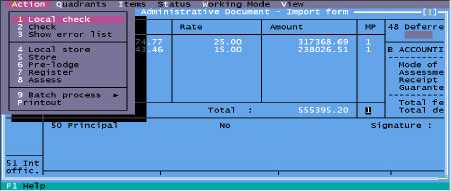
The following screen is a display of the 'Duties and Taxes' quadrant of a declaration, with the
‘Local Menu’ at the top of screen activated by using <F9>, and the 'Action' menu option selected:
Fig 3.2 MODCBR: Functions: Declaration: Amendment: EDI: F9.
Quadrants
Allows the user to move to other sections of the SAD, see previous section, ‘the SAD Layout on
screen’.
Items
A Declaration is made up of the 'Header' or 'General Sector' data (transport details, consignee,
declarant, total values, etc), and the 'Item' data. The Item data is commodity specific, including
such details as description of goods, packages, Commodity Codes.
A declaration accepts a minimum of one set of item details, or an unlimited number of additional
items. The basic declaration screen accepts the one item; to add an item ‘New’ must be selected
through his option. This menu item allows the user to input a new item, to delete an item or move
to any other existing item within the declaration.
Note: Item one must be displayed to access all the local menu options.
Status
Displays the current status and history of the declaration, ‘Status’ will bring up the window below:
Modified
Status
Operation
User
name
Date
Time
Version
Original
REGISTERED
Registration
ASY3
13/01/2000
10:52:57
1
Yes
REGISTERED
Registration
ASY3
13/01/2000
10:52:46
2
ASSESSED
Assessment
ASY3
13/01/2000
10:52:51
0
Column 1: Untitled
This column can either be blank or contain an arrow. An arrow indicates that this version of the
declaration can be retrieved using the VIEW DECL. button.
Column 2: Modified
This column can contain 3 different pieces of information.