MODCBR - CUSTOMS DECLARATIONS
Ó UNCTAD - SITE (V1.15)
3.16
The Local File
These are the declarations that have been stored on the Client PC with a file name and a .SAD
extension. The user can choose the required declaration from a window that lists all the file names.
EDIFACT CusDec
Declaration data, received and stored in the UN Standard EDI format 'CUSDEC' can be retrieved
from file and displayed as a SAD declaration, either for amendment or for transmission to the
Server for Registration or Assessment.
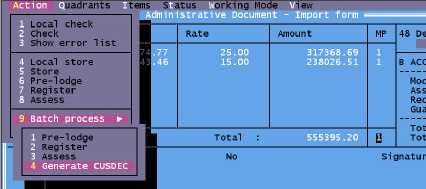
Note: to save SAD's in EDI format (CUSDEC), select the option "Generate
CUSDEC" in the Local Menu. See also ‘EDI Manager’).
Fig 3.4 MODCBR: Functions: Declarations: ..... Local Menu: Action: Generate CUSDEC
Stored declaration
Stored declarations have been stored on the Server using the declarant code and the declarant
reference number.
To retrieve this type of declaration the user must log onto the Server and identify the declaration by
entering the declarant code and declarant reference number for the declaration. The office code
and year of storage of the declaration appear as default.
Pre-lodged declaration
Not implemented.
Registered declaration
These are the declarations that have been registered on the Server. The Registration number
consists of the Series letter and a number.
To retrieve this type of declaration the user must log onto the Server and identify the declaration by
entering the declarant code and declaration reference number, or the Registration number of the
declaration. The office code and year of storage of the declaration appear as default.
Cancellation
This option allows the user to cancel a declaration that has already been input. The user can
cancel Stored or Registered declarations.
Depending on the control procedures adopted by National Administration, there
may be some additional controls involved in the cancellation of Registered
declarations.