MODACC - ACCOUNTING
Ó UNCTAD – SITE (V1.15)
4.13
Validating the payment
After entering the details of the payment, select ‘Local Menu’, ‘Action’ for a system check of the
payment details. You must ‘Validate’ the payment to record the payment transaction within the
system. See Local Menu Action. After validation the receipt number is inserted in the display on the
screen.
Using Credit Facilities
To facilitate clearance, payment of duty and taxes can be deferred by allowing ‘credit’ to a declarant
(or company). This credit should cover the duty and tax liabilities for an agreed period. A
predetermined credit limit is set, according to an agreement reached with the individual account
holder and subject to the provision of adequate security, such as a bank guarantee to cover the
duty and tax amounts. The agreement specifies the terms under which the credit account is to be
paid and includes the period allowed for settlement.
The use of credit facilities relies on an understanding of the three stages of the process: -
1. Establishing and activating a credit account for the declarant;
2. Accessing the account during the declaration preparation and assessment process; and
3. Periodic settlement of the account by paying the total duties and taxes deferred.
These stages are described in detail in the following pages.
Establishing a Credit Account
New Credit Accounts are created (and existing accounts modified) using the menu option
‘Functions’, ‘Account Management’.
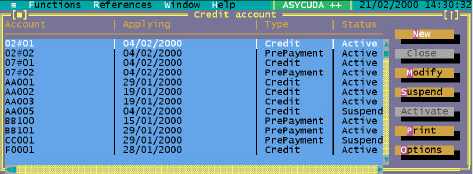
The ‘Credit account’ window is for the control and maintenance of both Credit and Pre-Payment
accounts. It displays a table of existing accounts showing the account code or number, account
type, current status, declarant or company code, and validity dates. An example screen display is
as follows:
Fig. 4. 2 ‘Functions: Account Management’
Opening or modifying a Credit Account
Select ‘Open’ (new account) or ‘Modify’ (existing account) to open the screen for credit accounts.
Note: to modify an existing ‘active’ account, the account status must be set to
‘suspended’. Use the ‘Activate’ and ‘Suspend’ controls within the Credit account
window to switch the account status.