MODACC - ACCOUNTING
Ó UNCTAD – SITE (V1.15)
4.14
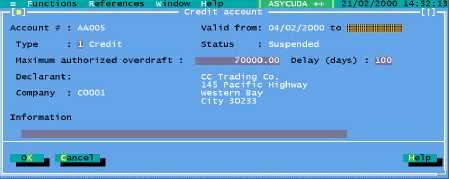
Fig. 4. 3 Modacc: Functions: Account Management: Modify
To set up a new credit account:
· Allocate a new Account number or code;
· Specify a validity period (system default is to start from the current date);
· Nominate the account type - using the <spacebar> (“1” for ‘credit’ or “2” for ‘Pre-
Payment’);
· Insert the amount of credit (‘overdraft’ or credit limit);
· Enter the period of deferment allowed for payments - “Delay (days)”;
· Insert Declarant or Company code - <F8> for a look-up table ; and
· Insert in the information box any further description relevant to the account (free
form text).
Note : When modifying an existing account, changes are limited to the amount, delay (days) and
the information text box.
A delay (number of days) must be set for the payment of credit account
statements. If generation of an account statement is requested, and there is no
delay set, the system will show an error message.
Before a declarant can use a credit account the account must be ‘activated’ and if declarations are
to be input using MODBRK a ‘secret code’ or PIN number (Personal Identification Number)
allocated. These are managed through the system.
It is recommended that when a credit account is created a pre-payment account
is also created to allow the accountholder to continue to process declarations if
the credit account limit is exceeded. It also allows for Customs to make
repayment of any taxes overpaid by the declarant or company.
Activating the Credit Account
Accounts are activated using the controls within the Credit account window. See the example
screen above – Establishing a Credit Account.
Access is through menu options ‘Functions’, ‘Account Management’ and requires server login.
The controls ‘Suspend’ and ‘Activate’ switch the status of an account.
Account Secret Code
For account security the account holder (declarant or company) is issued with a secret code that is
used together with the account code. This helps in confirming that a person using a Pre-Payment
account is authorised.