MODACC - ACCOUNTING
Ó UNCTAD – SITE (V1.15)
4.28
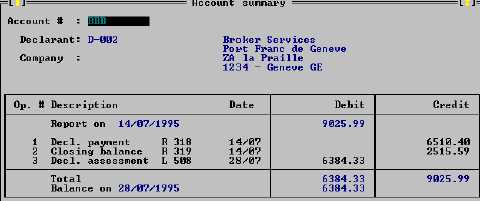
The account summary describes each operation against the account – both payments and
declaration assessments. The summary gives assessment and receipt numbers, with debit and
credit amounts and totals. The next screen is an example of an account summary report. (The
report can be printed, through the ‘Local menu’, ‘Print’ option.)
Fig. 4. 13 Function: Print/Query: Account: Account summary
Cashier's Reports
Cashier operations require certain basic reporting functions, to allow reconciliation of daily cash
takings, and for reporting of revenue collection. The standard reporting options for cashiers appear
on the 'Functions', 'Daybook operations’, 'Shift operations'.
Daybook Print/Query
There are three standard menu options for printing or querying the Daybook:
1. The provisional daybook;
2. The definitive daybook; and
3. Monthly report.
The 'Provisional daybook' allows a trial balance - to check transactions (receipts) against cash
takings - before the close of the accounting period, i.e., with the 'daybook' still open.
The 'Definitive daybook' is a report of transactions, covering the period in which the Daybook was
open, available after the daybook has been closed.
The Daybooks, (provisional or definitive), and the Monthly report can be printed in two forms - by
type of operation or by means of payment
'Type of operation' report lists all payments in and out within the Daybook period, and gives
reference details, such as receipt numbers, declarant code and transaction amount, with totals.
'Means of payment' reports give subtotals of transactions for the Daybook period and groups
according to the 'means of payment' codes; e.g. cash, cheque, guarantee etc.
Budget Account Report
The 'Definitive daybook' sub-menu has an additional reporting option: ‘Budget account’. The
standard Budget account report gives a bigger picture of revenue collections by the Administration,
within the reporting period. It gives: -
·
Totals of all transactions for the period (payments in and payments out), grouped and
subtotalled, first by budget code, then second by tax code; and
·
Shows amounts in two columns; (1) total duty/tax assessed during Daybook period; and (2),
total duty/tax collected for the Daybook period.