MODCAR - MANIFESTS IN ASYCUDA++
Ó UNCTAD – SITE (V1.15)
5.16
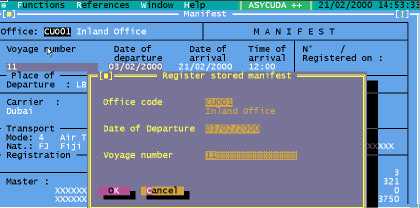
Fig 5.3 MODCAR ‘Manifest’, ‘Register’.
Enter the identifying details – Office code, Date of Departure and Voyage number. If there are no
errors in the stored declaration, the system displays the information box “Registration Is Done” with
a unique Manifest reference in the following format: -
Year
Number
Date
Time
YYYY
5
DD/MM/YYYY
HH:MM:SS
Correcting Errors
If there are errors on the Manifest, registration cannot proceed. You will be asked to ‘Check’ the
Manifest, to locate and allow correction of the errors. The stored Manifest and Bills of Lading can be
recalled using the ‘Functions’, ‘Manifest’, ‘Amendment’ or ‘Functions’, ‘Bill of Lading’,
‘Amendment’ options. Follow the error correction procedure as previously described (at page 10).
Note : a new Bill of Lading cannot be created after a Manifest is registered.
Amending Manifests and Bills of Lading
Manifest Amendment
Amend a Stored Manifest through ‘Functions’, ‘Manifest’, ‘Amendment’.
Choose either – ‘Change reference’ or ‘General Data’.