MODSEL - SELECTIVITY MANAGEMENT IN ASYCUDA++
Ó UNCTAD - SITE (V1.15)
6.15
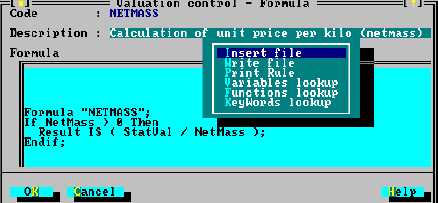
Fig 6.5 MODSEL : Functions: Value control management: Value control formula: Update (+ Local menu)
In this example the Code has been given the name “NETMASS” with the description “Calculation of
unit price per kilo (netmass)”. Moving into the ‘Formula’ text box activates the editing capabilities.
Writing a formula requires an understanding of ASYCUDA++ rules syntax. Lookup tables, for lists
of acceptable keywords, variables and functions, are available through the ‘Local menu’.
See Appendix A, "Taxation Management" for further details on using Rules and
Rules syntax. Descriptions of Selectivity keywords, functions and variables are
in MODSEL, Selection Criteria Syntax.
Apart from using the weight in the formula calculation, (e.g. ‘NetMass’), writing a valuation control
formula usually means calling upon one of a number of supplementary unit variables.
For example, a ComCode may have Supplementary Units, and the ‘order of appearance’ of those
Supplementary Units may vary between codes, what is ‘SuppUnits’ for one ComCode may be
‘SupValue1’ or ‘SupValue2’ for another.
Example:
Formula “UNIT”
If SuppUnits > 0 THEN
Result IS StatVal / SuppUnits;
Endif:
The coding example above is the basic formula for unit value calculation. It takes the item level
statistical value and divides by the variable, ‘SuppUnits’ .
The first line names the formula as “UNIT”. The second line is for error checking, by verifying that
‘SuppUnits’ has a value greater than zero. ‘SuppUnits’ is the primary data element used for
collecting and storage of quantity details. The outcome of the calculation is stored as a variable
called ‘Result’.
Selection Criteria Using Value Controls
The use of Rules to define criteria for selecting particular transactions or transactions which meet a
‘profile’
are
explained
in
Making
Selections
and
in
detail
in
Care must be taken to ensure that the variable chosen for use correctly
represents the Statistical Unit attached to the Commodity Code within
the Tariff file.