MODTRS - TRANSIT CONTROLS USING ASYCUDA++
Ó UNCTAD – SITE (V1.15)
7.19
If these two criteria are fulfilled than the system will generate a Manifest with a Bill of Lading for
each Commodity Code discharged. The generated Manifest can be viewed under the option
‘Functions’, ‘Manifest’, ‘View’.
Print/Query
View
The View options allow you to retrieve a TIR Carnet and it's most recent voucher, for viewing only.
A TIR Carnet of any status can be retrieved. The TIR Carnet number retrieves it. Possible
operations from the Local Menu of the TIR Carnet once it is retrieved are:
· Local store
· Printout
· Status.
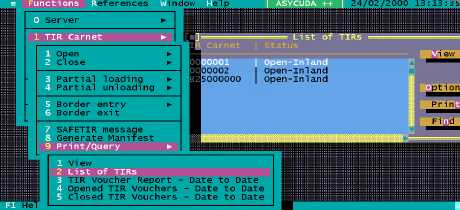
List
The List option allows you to select a list of TIR Carnets. The screen allows you to select the status,
date interval for the TIR Carnets to be included the list. There are 4 possible status as follows:
· Open
· Closed
· Customs control
· Any
The list of TIR Carnets works differently from the list of declarations in that the
list will give you details of operations that have been performed on the Carnet.
The TIR Carnet list is similar to the Status option in the Local Menu of a declaration. Example:
TIR Number
Status
10000006
Open-Inland
10000006
Open-Inland-Partially loaded
10000006
Closed-Border exit
Other details are given such as the validation date, time, etc.
Figure 7.9: ‘Functions’, ‘TIR Carnet’, ‘Print/Query’, ‘List of TIRs’