MODTRS - TRANSIT CONTROLS USING ASYCUDA++
Ó UNCTAD – SITE (V1.15)
7.20
From the TIR list two operations are possible:
View - View of the TIR Carnet with the most recent voucher.
Resend -This option is only possible if you have selected the list of 'ANY' TIR Carnets.
A closed TIR at the Office of Exit can be resent to the office where it was opened via the A++ Gate.
An open TIR at the Office of Departure or the last Office of Destination can be resent to the next
intended Office via the A++ Gate.
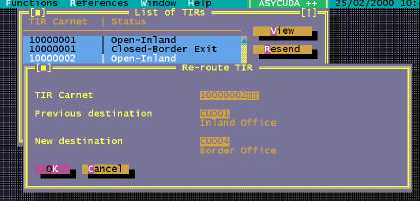
Re-route - This function allows you to re-send an Open TIR Carnet to a different destination than it
was originally sent to. This can only be done at the Office of Departure for this Carnet. If the TIR
Carnet has not been closed at the final Office of Destination or Exit, then you can re-route the TIR
to another Office. Choosing this option opens a window for you to capture the new Office of
Destination or Exit. This action will send the TIR Carnet data agent via the A++ Gate to the new
Office of Destination and update the information in the system concerning the next intended office.
Simultaneously an agent is sent via the A++ Gate to the Original Office of Destination to delete the
Carnet from their list, as it is no longer valid at that Office.
Figure 7.10: ‘Functions’, ‘TIR Carnet’, ‘Print/Query’, List of TIRs’
Server Reports
Three standard server reports are available for the TIR Carnet, these can be found under
‘Functions’, ‘TIR Carnet’, ‘Print / Query’ . These are: -
· TIR Voucher Report - Date to Date
· Opened TIR Vouchers - Date to Date
· Closed TIR Vouchers- Date to Date
The TIR Voucher Report gives the list TIR Carnets for a particular date interval based on a number
of parameters available on the screen (Office of Departure, status, holder, destination etc.).
The ‘Opened’ and ‘Closed’ TIR reports give a list of the open and closed TIR Carnets for a
particular date interval.