MODTRS - TRANSIT CONTROLS USING ASYCUDA++
Ó UNCTAD – SITE (V1.15)
7.22
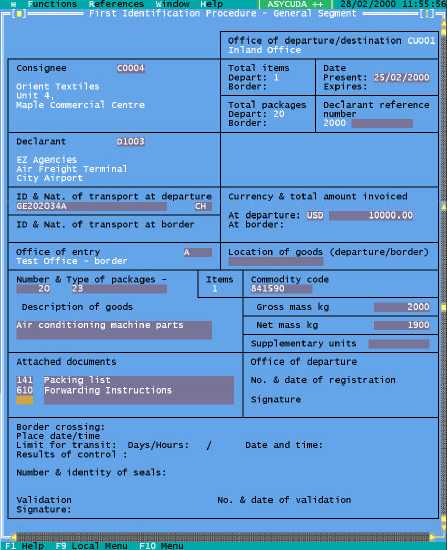
Figure 7.11: ‘Functions’, ‘FIP’, ‘Inland Office’, ‘New’, ‘Capture’.
Local Menu
Action Items Status
The ‘Action’ options under the Local Menu are as follows: -
· Local check
· Check
· Show error list
· Local store
· Store
· Register
· Printout
The user/declarant can store or register the FIP on the ASYCUDA++ server once the data has
been checked. Registration of the FIP automatically generates an ASY++ agent containing the FIP
and sends it to the Border Office specified on the FIP (Office of Entry field) and begins the period of
validity.