MODCHQCF - NATIONAL CONFIGURATION
Ó UNCTAD - SITE (V1.15)
8.11
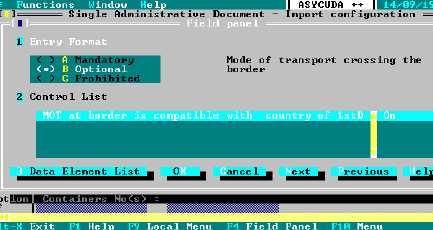
Fig. 8.4 MODCHQCF: Functions: National Standards: Declaration Configuration
For ‘Entry Format’ the field name is displayed on the right. The type of input format, ‘Mandatory’,
‘Optional’, or ‘Prohibited’, can be selected by clicking on the appropriate box or pressing A, B or C
as required and then ‘OK’.
A ‘Control List’ (if applicable to the field concerned) is displayed at the bottom of the screen.
These controls are contained in the ASYCUDA++ program and cannot be altered. They can only
be switched on or off if they have been assigned to the relevant field.
To switch the control, double click the mouse on the box or select the control and use the keyboard
spacebar, the control will toggle between ‘On’, ‘Warning’ and ‘Off’ . If the control is ‘On’ any failure
will prevent further processing. If the control is set to ‘Warning’ the system will warn the operator of
the failure but allow further processing. If the control is set to ‘Off’ the control is not done.
The fields to be configured can be selected either from the local menu ‘Quadrant’ option or by
selecting the ‘Data Elements’ list box on the bottom left of the screen and then selecting the
required field by double clicking on the list item or ‘Enter’.
Note: Fields filled with X's i.e. "XXXX" are system controlled and are not
configurable.
When the configuration is complete you must either click ‘OK’ or press ‘K’. This will close the
window and reveal the Declaration form below. To complete the process this window must be
closed by clicking on the square at the top left of the window. A box will open confirming the
modifications made by asking: “Save new configuration?” Click ‘OK’ to save.
At present the new configuration is only held on the local client machine and must be transferred to
the Server. The process to carry out this transfer is covered later in this Section.
The new national configuration is now active on the client PC. This is useful for
development and testing purposes. Declaration configurations and Rules
created under the ‘Taxation Standards’ menu option can be tested without
configuration transfer or server connection.
In addition to the configuration possibilities described above, the basic Import
and Export declaration configurations can be modified in MODCHQ. This allows
separate configurations to be defined for every Model of Declaration or new
Models of Declaration or be created for special situations. See Section 10 of this
Reference Document for details.