MODCHQCF - NATIONAL CONFIGURATION
Ó UNCTAD - SITE (V1.15)
8.18
Creating or Modifying Valuation Notes
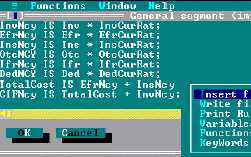
Selecting General segment section, Item section or an apportionment rule opens a text editing box.
In the example below, the ‘General segment (import)’ editor is open and the ‘Local menu’ is
displayed.
Fig 8.7 MODCHQCF: Functions: Taxation
standards: Import valuation note:
General segment section.
Examples of Pre-defined Export Valuation Rules
General Segment Section
Rule "SG_EXPORT"
InvNcy IS Inv * InvCurRat ;
IfrNcy IS Ifr * IfrCurRat ;
DedNcy IS Ded * DedCurRat ;
TotalCost IS IfrNcy - DedNcy ;
FOBVal IS TotalCost + InvNcy ;
This first defines the Invoice Value in National Currency, Inland Freight in National Currency and
Deductions in National Currency. It then defines Total Costs as Inland Freight less Deductions and
finally defines the FOB value as Invoice Value + Total Costs.
Item Section
Rule "ITM_EXPORT"
ItmInvNcy IS ItmInv * ItmInvCurRat ;
ItmIfrNcy IS ItmIfr * ItmIfrCurRat ;
ItmDedNcy IS ItmDed * ItmDedCurRat ;
ItmTotalCost IS ItmIfrNcy - ItmDedNcy ;
ItmStatVal IS ItmTotalCost + ItmInvNcy ;
This first defines the Item Invoice Value in National Currency, Item Inland Freight in National
Currency and Item Deductions in National Currency. It then defines Item Total Costs as Item Inland
Freight less Item Deductions and finally defines the Item Statistical Value as Item Invoice Value +
Item Total Costs.
See Appendix A to this Reference Document for a full of explanation on
the use of ‘Rules’ and the syntax used to build these rules. A current
listing of the Variables, Functions and Keywords available for use within
valuation rules is available from the Local Menu of ASYCUDA++.