TAXATION MANAGEMENT USING ASYCUDA++
Ó UNCTAD - SITE (V1.15)
A.9
Customs Headquarters National Configuration
MODCHQCF is used to build the national taxation structure, to apply taxes with general application
(independent of declaration procedures or Commodity Codes), and to define actions that the
System will use to calculate taxes. This is managed through a combination of Global, Item, National
Tariff and Taxation Rules.
National Tariff Rules
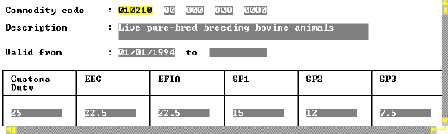
When details of a Tariff classification or Commodity Code within the National Tariff are displayed,
the screen looks like the example below:
Figure A.2: MODCBR: Reference: Customs Tariff: Commodity Code: Taxation
The column headings (labels) describe the tax on the Commodity, and the boxes contain the
matching rate of taxation. Any combination of these taxes can be applied to a transaction - either a
number of taxes, or by selecting alternatives. This is controlled through ' Taxation Rules'.
Building a Taxation Structure
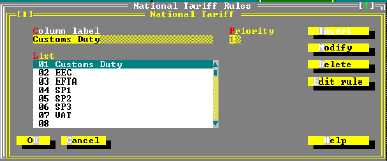
The example above shows an existing taxation structure. 'Tariff Rules' allow the building of the
'central body' of the Tariff, by defining the number of columns in the Tariff, assigning titles to the
columns, and setting a priority order for the order in which taxes are to be calculated. The columns
in the example above were created by the following structure
Figure A.3: MODCHQCF: Functions: Taxation Standards: National Tariff
Taxation Columns
Taxation columns define taxes and rates of tax with general application, such as Customs Duty and
VAT, and can also contain taxes that modify an existing tax, i.e. where tariff preferences are given.
For example, if a country is a member of a particular trading group, (such as
Tax '02', 'EEC', used in this example), a lower rate of tax may be payable on
imports from a country within that preference group. When a declaration is input
'Tariff Rules' recognise the country of origin, (from the declaration data), and the
System is instructed to calculate the tax within the 'EEC' column, which replaces
the normal rate of tax under the 'Customs Duty' column.