TAXATION MANAGEMENT USING ASYCUDA++
Ó UNCTAD - SITE (V1.15)
A.12
Valuation Rules are input through MODCHQCF. The normal Customs Import and export valuation
and apportionment rules are predefined within your system and so no modification of these Rules
should be required. The Rules are fully user definable to take account of any national requirements.
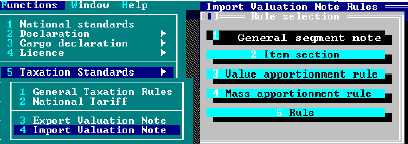
Figure A.5: MODCHQCF: Functions: Taxation Standards: Import Valuation Note
Rule selection options are available under both 'Export Valuation Note' and 'Import Valuation Note'.
The Rule selection window gives you the option to define
· General segment or declaration header valuation rule.
· Item section rule.
· Value apportionment rule.
· Mass apportionment rule.
· Rule (any other method of apportionment).
Selection of Apportionment Method
After apportionment Rules have been defined, the method of apportionment to be used on a
particular declaration can be chosen at the data input stage when the operator is in the Valuation
Note screen. Choice of method is available under <F9> Local Menu options.
General Segment Note
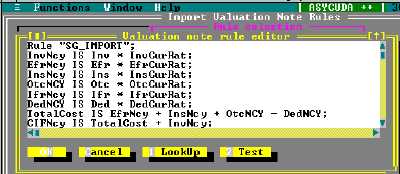
Under the General Segment Note, a Rule (similar to the predefined Rule below) takes the
declaration data that has been input and calculates the invoice value, freight, insurance, other
charges and deductions by converting into national currency. The Rule is structured as a series of
statements that assign values to variables, and those variables are in turn used for other
processing by the system.
A list of variables used by Valuation Note Rules is shown later in this Appendix.
Figure A.6: MODCHQCF: Finctions: Taxtion Standard: Import Valuation Note