TAXATION MANAGEMENT USING ASYCUDA++
Ó UNCTAD - SITE (V1.15)
A.14
ItmStatVal (Item statistical value) passes its value to StatVal - a variable that represents item
statistical value when used in Taxation Rules.
An 'action' under a Taxation Rule, such as
DoTax("ICD","1", StatVal, Rate(ComCod),(StatVal * Rate(ComCod)/100));
uses the contents of the variable StatVal as the TaxBase for tax calculation purposes.
By using this Rule, invoice item amounts are converted into national currency. Any additional
taxable value components are converted and added, and the total amount is used as the basis on
which the taxation for that item on the declaration is calculated.
Apportionment Rules
When a declaration covers more than one item, ASYCUDA ++ allows for different methods of
apportioning taxable amounts such as freight and insurance charges to the Customs value
(TaxBase) for each item on the declaration. Rules are predefined to apportion charges either on
the basis of value or of mass.
The method of apportionment to be used on a particular declaration can be chosen at the data
input stage when the operator is in the Valuation Note screen of the declaration.
Value Apportionment Rule
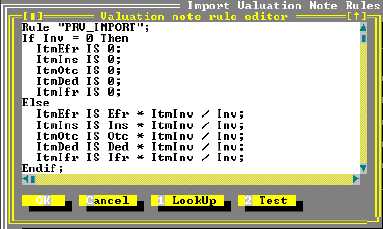
Valuation Note - (Valuation Apportionment) - Rule "PRV_IMPORT":
The following screen illustrates a typical Valuation Apportionment Rule - in this case, to initial
'standard' Rule as supplied with ASYCUDA++. It can be simply modified to allow for any National
variations in Customs Valuation law.
Figure A.8: MODCHQCF: Functions: Import Valuation Note: Value Apportionment Rule
This Rule checks if the Invoice amount is zero, if this is the case a value of zero is given to the
Freight, Insurance and Other Charges and to any Deductions. This prevents the system attempting
to divide by zero. If the Invoice amount is greater than zero, the apportionment of the Freight,
Insurance and Other Charges and any Deductions is done by taking the item invoice amount as a
percentage of the total invoice amount (ItmInv / Inv).