TAXATION MANAGEMENT USING ASYCUDA++
Ó UNCTAD - SITE (V1.15)
A.15
Mass Apportionment Rule
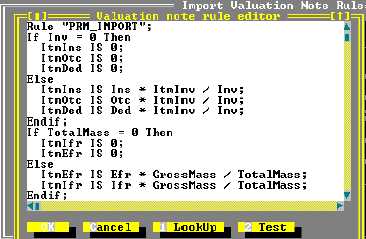
Valuation Note - (Valuation Apportionment) - Rule "PRV_IMPORT":
Figure A.9: MODCHQCF: Functions: Import Valuation Note: Mass Apportionment Rule
This Rule apportions External and Internal Freight according to Gross Mass, and apportions the
other value elements, Insurance, Other Charges and any Deductions, according to value
This Rule checks if the Invoice amount is zero and if this is the case a value of zero is given to the
Insurance and Other Charges and to any Deductions. This prevents the system attempting to
divide by zero. If the Invoice amount is greater than zero, the apportionment of the Insurance and
Other Charges and any Deductions is done by taking the item invoice amount as a percentage of
the total invoice amount (ItmInv / Inv).
For External and Internal Freight, the Rule checks if the Gross Mass is zero, and if this is the case a
value of zero is given to the External and Internal Freight charges. This prevents the system
attempting to divide by zero. If the Gross Mass is greater than zero, the apportionment of the Export
and Import Charges is done by taking the Item Gross Mass as a percentage of the Total Gross
Mass for the declaration.
Global and Item Rules
The Global and Item Rules define taxes to be applied at the highest level, usually taxes
independent of any declaration Procedure Code or Commodity Code classification. Global and
Item Rules are set up through MODCHQCF. They are accessed through menu choices
‘Functions’, ‘Taxation Standards’, ‘Global’ or ‘Item Rules’, ‘Edit Rule’.
Example 1:
Rule “FEE”;
Action is DoTax(“FEE” , ”1”, ItmTotal, 2, ItmTotal*2) ;
In this example an Administration has imposed a computer-processing fee on all declarations
processed through the ASYCUDA++ System. The Rate for the fee has been set at a flat fee of two
National Currency Units (NCU – francs, dollars, etc) for each item line on the declaration
processed.
The number of items ItmTotal (General Segment: Total number of items) is multiplied by 2 NCU.
This is output on the declaration as an additional amount payable.