TAXATION MANAGEMENT USING ASYCUDA++
Ó UNCTAD - SITE (V1.15)
A.17
Example:
A Value Added Tax of 5% may apply to most commodities in the tariff. The 5%
rate could be entered against each Commodity Code under the VAT column. If
the rate is increased to 6%, each Commodity Code line with "VAT" "5%" must be
updated.
If instead a code is used to represent the numeric value of the VAT rate, and this code is inserted
into each Commodity Code line under the "VAT” column, then changing the numeric value of the
code from "5" to "6" updates all of the Commodity Code lines containing the code.
Similarly, when a Commodity is exempt from a particular tax, the code is given the value of 0.00.
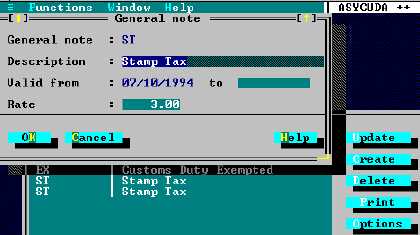
The example below shows code "ST" for Stamp Tax with a rate of 3%.
Figure A.10: MODCHQ: Functions: Datbase Management: Customs Tariff: Tariff Components: General Note
Taxation Processing
General segment level
To calculate taxes on a declaration the taxation process retrieves and performs the applicable rules
from the national configuration. These include 'General Application Rules' such as taxes to be
applied at a high level, independent of any declaration procedure or commodity, and 'Valuation
Rules', where the tax base is calculated from declaration data.
Declaration item level
The taxation process retrieves the list of applicable rules from
· The national configuration for every tax column in the tariff;
· The table of General notes;
· The table of Taxation Rules; and
· Sorts the retrieved rules according to priority, and performs them in that order.
Rates of Taxation
Rates of taxation are input directly into the taxation columns for each Commodity Code. The
Commodity Codes are accessed through MODCHQ, menu options
MODCHQ, ‘Functions’, ‘Database Management’, ‘Customs Tariff’, ‘ Commodity Code’.