MODCHQ - SET UP AND MAINTENANCE
Ó UNCTAD – SITE (V1.15)
10.15
See the other parts of this Section and also Appendix ‘A’ , ‘Taxation
Management’, for more detail on taxation rules and explanation on the
programming language used within rules.
Commodity Code
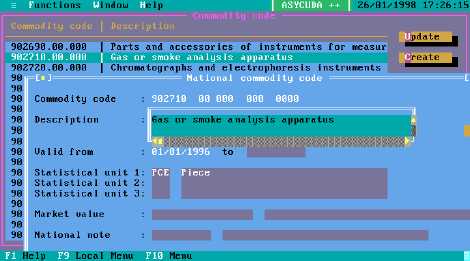
This option allows all of the normal Tariff update functions. It permits the definition of national sub
divisions of the Commodity Code and the insertion of rates in the Tariff columns. It also allows the
insertion of Statistical Units, Market values, National notes and Taxation Rules.
The screen is too large to be displayed on screen at one time but the bottom part of the screen can
be scrolled in the normal way.
Fig. 10.12 MODCHQ : Functions: Database Management: Customs Tariff: Commodity Code
To create a national Tariff Commodity Code sub-division the ‘Create’ option is used. To insert rates
etc normally only requires the ‘Update’ option.
The screen allows the inclusion of up to three Supplementary Statistical Units. When a declaration
is processed that has a Commodity Code with one or more Supplementary Units defined, the
Supplementary Unit field or fields on the SAD becomes mandatory.
The insertion of a predefined Market value will apply that Market Value in the way that is defined in
the value including any applicable rule.
A predefined National note can also be inserted in the Commodity Code using
this menu option.
For example: if in your tariff a trade agreement applied to goods of Chapter 30,
and Additional Column number 20 gave a reduced rate of import duty of 5% for
Chapter 30.
Use an Item Taxation Rule to recalculate duty. The rule will include: A conditional
statement: e.g. ‘If country is an eligible preference country and the Column 20
preference code is claimed then’
Action is RelTaxPart(“ID”, “PRF20”, CustValue, RateCol(Comcod, 20), CustValue
* RateCol(Comcod, 20)/100));