MODCHQ - SET UP AND MAINTENANCE
Ó UNCTAD – SITE (V1.15)
10.26
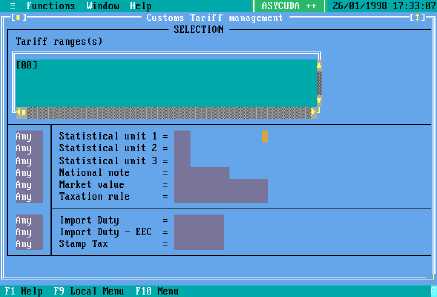
Fig. 10.20 MODCHQ : Functions: Database Management: Simplified Management: Customs Tariff
Defining the Tariff Range
To update by inserting or altering common data within a block of commodity codes, first specify the
commodity code range. The syntax of the ‘Tariff ranges’ editing box is simply explained as follows:
The tariff code must be enclosed in square brackets and the Commodity Code coverage is from
two digit level to eleven digits.
Tariff ranges can be used but the syntax requires that the ranges be defined in pairs, using a
comma as a separator:
Multiple selections can be made, either of ranges or by combining single selections.
Example: [8701] - Specifies all commodity codes within heading 8701.
For example , at Chapter level, like [87], or – specific as the lowest level
national subdivision, such as [87011010000].
Examples:
a)
[01, 05] - selects all commodity codes in chapters 1 to 5.
b)
[ 5501, 550110] - selects all commodity codes on from heading 5501 up
to and including subheading 550110.