MODCHQ - SET UP AND MAINTENANCE
Ó UNCTAD – SITE (V1.15)
10.5
Customs Headquarters Functions
The functions for set-up and on-going maintenance of the ASYCUDA++ system are contained
within Module MODCHQ. This Module is also called the Customs Headquarters Module. Within
this module 'Headquarters' staff set up the System control tables that contain all the reference data
necessary to run ASYCUDA++. In a 'live' ASYCUDA++ installation, MODCHQ is used for the
routine maintenance of control table data and for statistical report extraction.
Control tables include the Customs Tariff and all components of the Tariff, Tax and Duty rates,
including preference, Customs Procedure Codes and Currency Rates of Exchange.
Other control tables, grouped within the headings ‘Operational Environment’ and ‘Transaction
Controls’ , cover Customs Office and Warehouse codes, Declarant and Company codes, Carriers,
Banks, Budget and Tax Codes, Countries, Currencies and Modes of Transport.
MODCHQ also contains a number of pre-defined reporting formats for extraction of national trade
statistics and loss of revenue statistics from the transaction database. The reporting options are
sufficiently flexible to meet most general reporting needs.
For an understanding of the process of setting up a national tariff structure or regime, applying
taxation rates, and the use of ASYCUDA++ 'Rules’, see Section 9 of this Reference Document
‘National Configuration’.
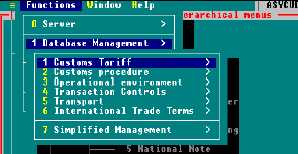
The Functional Menu of MODCHQ
Options on the main menu for Module MODCHQ ('Functions') are as below:
Connecting to the Server
Section 2, ‘Using ASYCUDA’, explains the server Login procedure.
Note: Most of the menu options in MODCHQ require that you be logged on to
the server. This is because any alterations to control tables are made directly to
the System files on the server.
Fig. 10.1
‘MODCHQ: Functions:
Database Management’