MODCHQ - SET UP AND MAINTENANCE
Ó UNCTAD – SITE (V1.15)
10.8
These options are described as follows:
Preferences
This option allows the setting up of the different trade preference groupings that apply in your own
country.
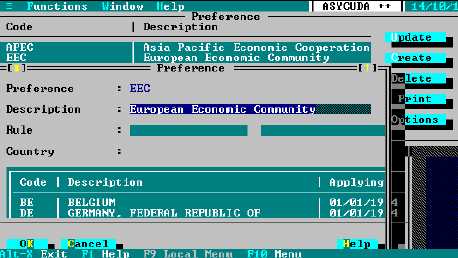
Fig. 10.5 MODCHQ: Functions: Database Management: Customs Tariff: Tariff Components: Preference
To set up a Preference requires the inclusion of the appropriate countries for which the preference
is applicable and these country codes must already exist in the Country Reference Table.
‘Preferences’ are an example of the two-stage process for setting up a new code within
ASYCUDA++. The ‘two-stage’ process is necessary when the new code relies on links to another
reference table.
Step 1 is to select ‘Create’ to open the screen for a new code. Enter a code name. For ‘Preference’
the name is limited to eight characters (No spaces are allowed.) Enter a description of the
preference or trade agreement. Select ‘OK’ to save. (This closes the window.) Your new code now
appears in the list of Preferences.
Step 2 is to select the name of your new code and press ‘Update’. Move to the ‘Country’ list box
and press insert. Select the preference country from the ‘Countries’ table window and select ‘OK’.
Select any other countries party to the preference agreement and, when complete, select ‘OK’ to
close the ‘Preference’ ‘Update’ window.
It is possible to insert a rule that has been defined under the ‘Rule’ option
explained later in this section. This could be used to introduce a modification to
the values or the duties and taxes calculated on them. It could also be used to
attach a document code for the certificate of origin or other additional document.
Statistical Units
This option allows the definition of the statistical or Supplementary Units that you need to use in
your Tariff. That is any unit of measure to be captured for statistical or fiscal purposes, in addition to
kilos that is captured by default if the net and gross mass fields are active in the declaration
configuration in MODCHQCF. The set-up of the code is simple, requiring only a code and
description.