FINDING YOUR WAY AROUND ASYCUDA++
Ó UNCTAD - SITE (V1.15)
2.15
Remote
The second option is under ‘Tools’, ‘Printer Manager’, ‘Remote’. This menu option displays lists
of prints or reports requested from the ASYCUDA++ server. The list shows the status of the users
requests - the job number, the type of report, the start date and time, and if the report is complete,
the finish date and time. Viewing the list and status of remote (server) prints means that the user
must login to the server.
Further printer functions are available under ‘Options’, ‘Printer’. These are
Setup’, ‘Installation’ and ‘Document’. See the section on ‘Printers‘ or for full
details refer to the relevant Technical Documentation.
Batch Jobs
This option is used to manage and list the batch processes that are used in ASYCUDA++. They
allow certain routine functions to be automated and they must be used to allow certain functions
within ASYCUDA++ to operate, e.g. the automatic assessment of declarations after a predefined
period.
Operation of batch processes is a technical function and beyond the scope of
this Reference Document. Full details are contained in the Technical
documentation.
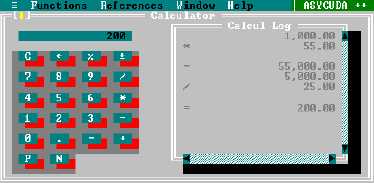
Calculator
A calculator is available with the following functions: -
/
Division
*
Multiplication
+
Addition
-
Subtraction
%
Percentage
C
Clear calculation
¬
Delete the latest figure selected
P
Print-out the calculation
N
Clear all the calculations that appear on the work screen.
Fig 2.7 Tools
Calculator