FINDING YOUR WAY AROUND ASYCUDA++
Ó UNCTAD - SITE (V1.15)
2.21
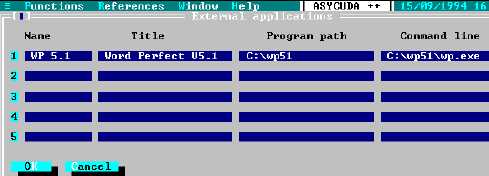
Fig. 2. 13 Options: Applications
Save options
Saves your personal settings, in configuring the client PC using the choices available under the
'Options' menu. You should always select ‘Save options’ after any change to your network
connections.
About
Displays information about the version of the ASYCUDA++ program that is installed. It identifies the
Customs office and the ASYCUDA++ module in use and gives copyright details.
Using References Tables
ASYCUDA++ User Modules have a menu option called 'References' on the top status line of the
screen. This option lets the user search for and display data relevant to their current task. This data
is taken from the reference or control tables i.e. codes and descriptions that a User draws on in
processing a transaction. These are used in the day-to-day functions of the Customs Branch offices
for declaration processing, inspection, cashier, selection, cargo control, transit, etc.
Access, in 'read only' mode, is given to most control tables or reference data within the system.
For example, within MODCBR, the Reference sub-menu options are:
1. Customs Tariff
2. Customs procedure
3. Operational environment
4. Transaction Controls
These Reference menu options give access to complete details on Commodity Codes (including
HS Tariff descriptions and taxation rates), Customs Procedure Codes (with National 'Additional
Code' extensions), Office, Warehouse, Transit Shed, Declarant, Company, Country and Currency
Codes and many others.
A description of all the options that can be displayed under the ‘Reference’ menu in the various
ASYCUDA++ Modules is given in Part 3 of this Reference Document.
Note: System users in a normal 'production' environment, such as declaration
processing, may not be given access to the full range of reference data held on
the system. For many valid reasons, including system security and
confidentiality of data, access may be limited to only that part of the reference
data immediately relevant to the user's duties. System controllers can manage
this from within the User Group set up (‘Menu access control’) through local
system configuration MODSYSCF.