MODCBR - CUSTOMS DECLARATIONS
Ó UNCTAD - SITE (V1.15)
3.31
What is EDI?
EDI is the electronic transfer of commercial or administrative transactions using an agreed
standard to structure the transaction or message data. EDI is designed to facilitate the
transmission of commercial or administrative data such as invoices, purchase orders, ship arrival
notices, packing lists, customs declarations and the like. The purpose is to adopt a common
communication standard to allow otherwise non-compatible computer systems to 'talk' to each
other and to permit electronic information to be transferred from one transaction point to another, to
be 'reused' and added to, without any need for re-keying.
UN/EDIFACT is an international EDI standard. It is the only EDI standard that has received official
approval by the United Nations. UN/EDIFACT permits organisations, both public and private, to
transmit data in a common format - a common computer language. Among the officially approved
UN/EDIFACT messages there are four so far which are unique to Customs operations.
The four Customs messages are:
· The Customs Declaration Message (CUSDEC);
· The Customs Response Message (CUSRES);
· The Customs Cargo Report Message (CUSCAR);
· The Customs Conveyance Report Message (CUSREP).
The electronic format CUSDEC is for the Customs declaration - it permits transfer of data from a
Declarant directly to a Customs administration.
EDI Messages in ASYCUDA++
CUSDEC - the Customs declaration in the UN/EDIFACT standard format - can be created by
being stored in the CUSDEC format from the Local Menu in Declarations. (See ‘Batch processes’.)
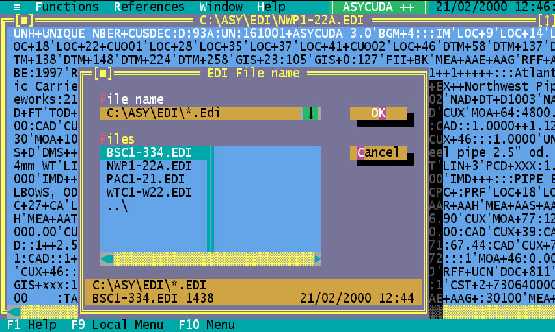
The 'EDI Manager' menu option accesses the System sub-directory ([drive]:\asy\edi\*.EDI) and
displays in a window the contents of the sub-directory. Files in EDI format can be selected for
viewing of the CUSDEC message on screen.
The following screen shows a CUSDEC message, overlaid with the EDI Manager window:
Fig 3.7 MODCBR: Functions: EDI Manager