MODACC - ACCOUNTING
Ó UNCTAD – SITE (V1.15)
4.9
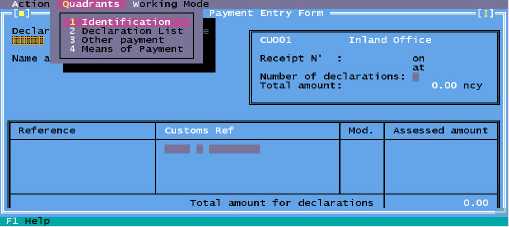
Fig. 4.1 Modacc: Functions: Payments in: Local Menu
The Local Menu
On the screen above 'Local Menu' is activated.
To access the Local Menu, move the mouse to place the cursor on the option for local menu on the
bottom status line, then press the left or right button.
It is also possible to access the Local Menu by <F9> or the right mouse button anywhere on the
screen background.
Local menu options relate to the function in use or to the location of the user in
the active screen.
In payments of declarations the local menu displays the following options on the top status line: -
Action
Quadrants
Working Mode
The Local Menu options on this screen work as follows: -
Action
Local check
Choose this option to check the data entered against the reference and transaction files. The
system displays a window informing you that your data is correct or a window containing a list of
errors.
Validate
Choose this option to confirm the information entered and process the declaration through the
accounting system. A window will appear for the user to choose to print the receipt.
Quadrants
Allows the user to move to other sections of the receipt, see Cash Payment Screen.
Working Mode
Allows the user to select the method of identifying the declaration/s to be paid. Either the reference,
registration or assessment number can be used for accessing the declaration. It also allows the
calculation of the payment in Foreign Currency.