MODACC - ACCOUNTING
Ó UNCTAD – SITE (V1.15)
4.24
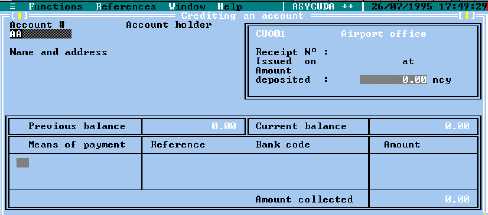
Fig. 4.11 Functions: Payments in: Crediting account’
The Local Menu
The screen ‘Crediting an account’ has an ‘Local Menu’.
For a description of how to use Local Menus and an explanation of the options available from the
Local Menus of payment entry form screens, see The Local Menu. This Local Menu has only the
‘Action’ option, which allows ‘Local Check’ and ‘Validate’.
Validation of the payment is necessary, to transfer the transaction details into the ASYCUDA
accounting system.
To credit an Account
In making a payment into a Pre-Payment account, Functions: Payments in: Crediting account’, the
cashier enters in the ‘Crediting an account’ window the following information: -
· Account reference. A display of the Account holder’s name and address will
appear on screen.
· The total amount to be paid on deposit. This updates the ‘Previous balance’ and
the ‘Current balance’ amounts displayed in the window.
· The means of payment code, e.g. 1 for cash, 2 for cheques. A ‘Look-up’ table is
available via <F8>.
· Any reference required for the mode of payment e.g. if paying by cheque, the
cheque number and bank code.
· The amount paid for the mode of payment.
Note: Up to three modes of payment can be entered on the one receipt. For
example, part payment in cash and part payment in cheque.
Validating the payment
Enter the details of the payment, then select ‘Local Menu’, ‘Action’ for a system check of the
payment details.
You must ‘Validate’ the payment to record the payment transaction within the system. See Local
Menu, Action.
After validation the receipt number appears in the display on screen.