MODACC - ACCOUNTING
Ó UNCTAD – SITE (V1.15)
4.27
List of Declarations
This option allows you to access the server database to extract a list of declarations.
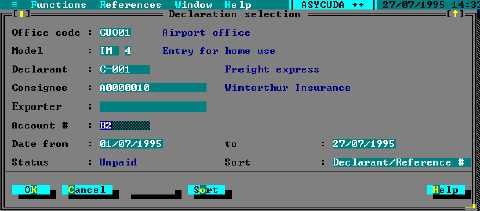
An example of the Declaration selection screen follows:
Fig. 4. 12 Functions: Print/Query: Unpaid declarations
The server extraction of declarations lets you say which declarations you want included in your list.
As the screen above demonstrates, you can specify any combination of the following:
·
Office code
·
(Declaration) Model
·
Declarant
·
Consignee
·
Exporter
·
Account code
·
A date range (“from ....to”)
‘Look-up’ of reference tables is available through <F8> . You can also specify the
order in which you would like the query result displayed. The <spacebar> can be
used to cycle through the sort options.
Account Summary
Selecting the option ‘Function’, ‘Print/Query’, ‘Account’, ‘Account summary’ opens a window
called ‘Account summary selection’. You must first login to the server.
To display details of an account, enter in the ‘Account summary selection’ window:
· The Credit or Pre-Payment account reference number or code;
· In the pop-up window, enter the correct ‘secret code’ for the account;
· Make a summary selection: the available choices are ‘last exercise’ and ‘date
interval’; and
· If you select ‘date interval’, specify the date range. (The date range must be within
the validity date range of the account)