MODCAR - MANIFESTS IN ASYCUDA++
Ó UNCTAD – SITE (V1.15)
5.7
When the user is using the Manifest or B/L screens, the ‘Local Menu’ can be
activated to move between documents, allow actions or confirm the current
status of the document.
Data Capture
Capturing Manifest Details
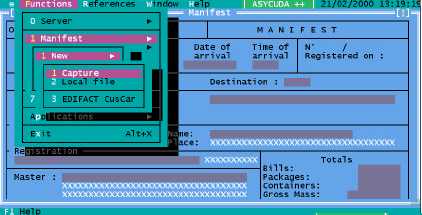
Select ‘Functions’, ‘Manifest’, ‘New’, ‘Capture’, to display the Manifest General Segment screen.
The Manifest screen contains the following fields, subject to the national configuration for the
manifest, as set in MODCHQCF: -
Office - Office Code number appears automatically (i.e. via office configuration).
Voyage Number - Enter aircraft flight number/vehicle registration number, (e.g. OS 863, SK 840
AB) to obtain a unique reference.
Date of Departure - Enter the date of departure from previous place of departure. The date format
is dd/mm/yyyy (e.g. 01/01/2000).
Date of Arrival - Enter relevant date. The date format is dd/mm/yyyy (e.g. 01/01/2000).
Time of Arrival - This is not mandatory.
Place of Departure - Enter place of departure code. This begins with the international two-letter
country code e.g. BGSOF [Sofia, Bulgaria] or press <F8> for a list of codes.
Destination – Enter appropriate code of the destination where the goods will be Customs cleared
or press <F8> for a list of codes.
Carrier - Enter carrier details if required.
Transport Mode - Enter appropriate code or press <F8> for a list of codes.
Transport Nationality – Enter country code for the Nationality of transport or press <F8> for a list
of codes.
Name - Mandatory or optional and could contain the name of the ship, or similar.
Place - Mandatory or optional and could contain the port of registry of a ship or place where the
carrier’s head office is located.
Fig 5.1
MODCAR:
Manifest: New:
Capture.