MODCAR - MANIFESTS IN ASYCUDA++
Ó UNCTAD – SITE (V1.15)
5.8
Registration – Enter the registration details of the means of transport in field 1 and any additional
details required in field 2 or leave field 2 blank. It could contain the vehicle registration number, the
international registration for an aircraft, or the Lloyds registration number for a ship.
Master – Details of the Captain or Pilot.
Totals – Summary details of the cargo. Enter details into the relevant fields for the total number of
B/Ls on the Manifest, the number of packages, the number of standard international shipping
containers and the Gross Mass in kilograms.
Tonnage – Gross and Net. - This refers to the total tonnage of a ship. This information is not
normally needed for Customs purposes.
Last discharge – Provision to acquire the date of the last discharge of the ship.
This completes the general segment details for the Manifest.
Remember that certain fields are essential. For example, the Office code,
Voyage number and Date of departure are the key identifying fields for storing
and retrieving the manifest within ASYCUDA. Similarly, the totals are used to
check and validate the bill of lading details. Many of the other fields are
configurable from within MODCHQCF. See Section 8 of this Reference
Document for details.
Capture Bill of Lading Details
Note that in this context the term ‘Bill of Lading’ is intended as a general
description that covers a broad range of transport documents.
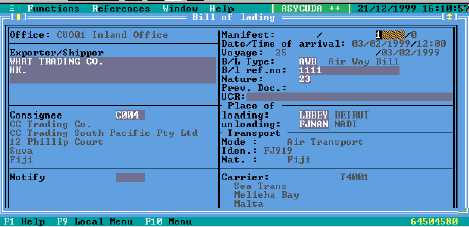
A schedule headed “List of Bills of Lading” will appear on the screen. This is below the Manifest
general segment details. You may need to activate the scroll bars to move down the screen. Press
Enter and a screen headed ‘ Bill of lading’ will appear. Some of the data keyed into the Manifest
general segment will already be displayed in the relevant fields of the B/L.
Fig 5.2 MODCAR: Manifest: New: Capture B/L.
Bill Of Lading Fields
Manifest - Key the sequential number for the B/L you are entering.
B/L Type - Key the alpha or numeric code for the type of transport document, e.g. ‘AWB’, ‘TIR’ or
press <F8> for a list of codes. Degroupage of the B/L is only possible for certain codes. (See the
degroupage field in the <F8> list).