MODSEL - SELECTIVITY MANAGEMENT IN ASYCUDA++
Ó UNCTAD - SITE (V1.15)
6.13
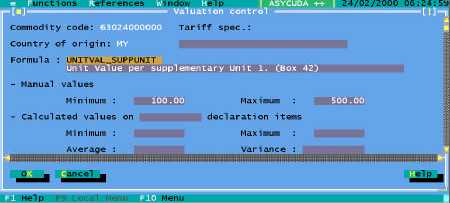
Fig 6.4 MODSEL : Functions: Value control management: Value control file: Update
User Input Fields
The user input fields within the record are:
· Commodity code (to national precision), press <F8> for a list of codes;
· Tariff specification (for a more detailed description than available at Commodity Code level);
· Country of origin, press <F8> for a list of codes;
· Formula, press <F8> for a list of codes - See the following section, Value Control Formula;
· Manual values: Minimum;
· Manual values: Maximum.
Calculated values
The system also display fields for calculated values. These would be based on historical data
gathered from previous import Declarations.
The display shows: -
· The number of matching declaration items (on which the calculations are based);
· The minimum and maximum declared values;
· The average value;
· The variance in values.
To Create a New Value Control Record
Firstly, the goods are described, using the Commodity Code and the ‘Tariff specification’ if
appropriate. In many cases, values of Commodities vary from country to country, and so the Value
control file would usually contain a separate record of value for each country of origin, at least for
those countries of origin where Customs had concerns about the values.
The ASYCUDA++ program does not manage the automatic update
of these fields and it is left to individual countries if they require this
option to undertake the necessary programming.