MODSEL - SELECTIVITY MANAGEMENT IN ASYCUDA++
Ó UNCTAD - SITE (V1.15)
6.23
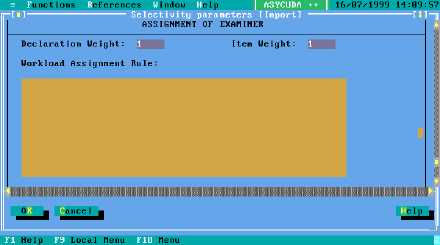
Figure 6.7 MODSEL : Functions: Selectivity management: Selectivity parameters: Import (+ scroll down)
In the example above the weights have been altered to 1 per declaration and 1 for all items after
the first. If the workload changes according to other parameters such as nomenclature or
procedure code, defining a workload assignment rule in the box illustrated above can do this.
Example of a rule modifying a weight: With the default weights, a declaration with 8 items would
give the following weight:
10 + 8 x 5 = 50, on top of which you may add a supplementary weight set at workload rule level
using the "Suppweight" variable.
Example:
Criteria "SuppWeight"
If Typproc = "1" then
Suppweight is Suppweight + 10;
Endif;
The rule is triggered at item level. This means that the additional weight is added to workload on
every item. The total workload is the declaration and item weight plus the total weight calculated
from the rule, if applicable.
Declaration management
Once a selected declaration has been verified it is then re-routed to Green or cleared. It is only at
that time (during re-routage or clearance) that the declaration will be, from the system point of view,
considered as verified. Re-routing to Green or clearance will force the workload and current number
of declarations to decrease automatically on both G1 and G2 selected Examiners for that
declaration. On the other hand, re-routing from GreenLane To YellowLane or to RedLane will
trigger automatic assignment of an Examiner if configured to do so.
Anyone who has access to re-routing facilities (in terms of group profile authorisations) can re-route
and assess any selected declarations, G1 and G2 selected officers for a given declaration do not
have any special authority regarding the declaration. For security reasons, automatic assignment
and manual assignment will be mentioned in the status of the declaration as well as the identity of
the G1 officer who has been assigned.