MODSEL - SELECTIVITY MANAGEMENT IN ASYCUDA++
Ó UNCTAD - SITE (V1.15)
6.6
Selectivity Parameters
A sub-menu under 'Selectivity parameters' allows selection of parameters for both import and
export. Both screens are identical in appearance and operation.
The import and export selectivity parameters are for the office you are currently
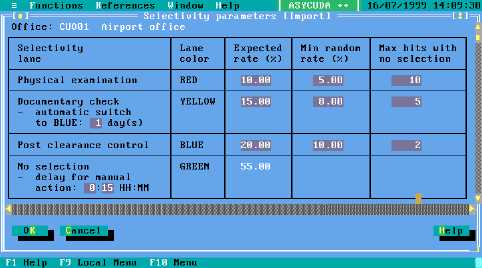
configured for. In the example screen at figure 6.1 below, the selectivity
parameters are for Customs office code ‘CUO01’ (Airport office). See Section 9
of this Reference Document for details of office configurations.
The 'parameters' screen is as follows:
Fig 6.1 MODSEL: Functions: Selectivity Parameters
The lower part of the screen (not illustrated above) is used in conjunction with
the Examining officers functions explained later in this section.
Selectivity Lane and Lane Colour
This allows allocation of the selected declaration to one of four paths, for different types or levels of
Customs processing checks plus a query lane.
While a Customs Administration can determine exactly what type of action will be carried out when
a declaration is selected for a particular lane, these actions are broadly described as follows:
Red Lane
Declarations selected to Red Lane are to be physically examined before assessment is permitted.
Yellow Lane
Declarations selected to Yellow Lane are to be presented to Customs for a full documentary check
before assessment proceeds.
Blue Lane
Declarations selected to Red Lane are subject to Post Clearance audit. This provides flexibility,
and can allow Customs to make more efficient use of their resources, such as allowing release of
'low risk' goods, subject to some type of audit control at a later date.