MODTRS - TRANSIT CONTROLS USING ASYCUDA++
Ó UNCTAD – SITE (V1.15)
7.13
Action
Voucher
Status
The operations possible under the ‘Action’ option of the Local Menu are: -
Local check - (Client PC) – server connection not required;
Check (Server check);
Show error list;
Local store (temporary storage of the TIR Carnet on your client PC);
Store - (temporary storage of the TIR Carnet on the Server);
Validate (Open);
Printout.
Validate
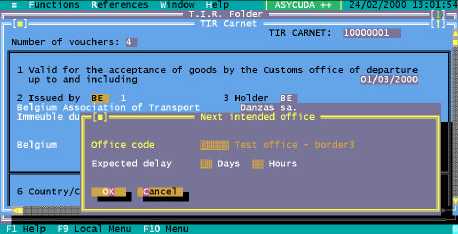
The action of validating ‘OPENS’ the TIR Carnet. Carrying out this action opens a window where
you are asked to capture the code of the next intended office and the maximum delay in days and
hours for the goods to arrive there. This is the office where the data on the TIR Carnet will be sent.
Figure 7.3 ‘Functions’, ‘TIR Carnet’, ‘Open’, ‘F9 Local Menu’, ‘Validate’
The next intended office could either be a Border Office for a Border Exit or a 2nd Office of
Departure for a Partial Loading. On validation the system automatically generates an A++ Gate
agent containing the TIR data and sends it to this next intended office. The TIR is considered to be
‘OPEN-INLAND’.