MODTRS - TRANSIT CONTROLS USING ASYCUDA++
Ó UNCTAD – SITE (V1.15)
7.15
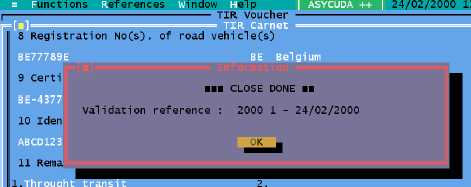
Figure 7.6: ‘Functions’, ‘TIR Carnet’, ‘Close’, ‘Close’.
The user is automatically asked: “Do you want to place this TIR Carnet under customs control?”
If NO -the TIR Carnet remains on the screen as read only. The TIR can be placed under customs
control by generating a Manifest using the separate option: ‘Functions’, ‘TIR Carnet’, ‘Generate
manifest’.
If YES - a Manifest is automatically generated with a Bill of Lading for each Commodity Code
unloaded.
The voyage number of the generated Manifest is the same as the TIR Carnet number. The
Manifest can be viewed with the option ‘Functions’, ‘Manifest’, ‘View’.
The Manifest generated will have a voyage number that is the TIR number. The status of the Bills
of Lading will be ‘REGISTERED’ and the operation will be ‘FROM TIR’.
Cancellation
This allows you to cancel a TIR. Cancellation can only be done at the Office of Departure for the
subject TIR, either an Inland Office or at Border Entry. If the TIR has not already been closed at the
next Office of Destination, then you can cancel the TIR.
Enter the TIR number and the system checks that the TIR was created at the current office and that
it is open and has not been closed. If this is the case, the TIR will be cancelled and be given the
status ‘CANCELLED’. A message is sent via the A++ Gate to the Office of Destination to cancel
the TIR so it can no longer be closed. It will therefore be ‘CANCELLED’ at the Office of Destination
also and no further action can be taken on this TIR.
Partial Loading
A ‘Partial Loading’ is the further addition of goods in the reference country and adding new
Office(s) of Departure. It can only be carried out in an Office of Departure defined on the voucher
and cannot be carried out in a third country or in an Office of Destination not already defined on the
voucher.
The first sub-menu option under ‘Partial Loading’ is ‘Close and Load’. This is because the action
of Partial Loading is in 2 parts -
Close;
Open (Validation of the loading).
The goods have been received from a previous office (an Office of Departure or Border Entry or an
Office of Partial Loading). The TIR Carnet is open, so it needs to be closed before loading.
The first operation is to retrieve an open TIR Carnet and close it by completing the bottom right
hand side of the voucher. The TIR Carnet can then be closed, with this Carnet data agent sent
back to the office of Departure via the A++ Gate. The carnet field for the number of packages
discharged is set to ‘0’, since nothing is being discharged. The TIR is considered to be ‘CLOSED-
PRE-PARTIAL LOADING’.
The user is automatically asked: "Do you want to partially load now?"