MODTRS - TRANSIT CONTROLS USING ASYCUDA++
Ó UNCTAD – SITE (V1.15)
7.18
· Store
· Validation
· Printout
Validation of the TIR Carnet opens a window requesting the next intended Office of Destination and
the maximum time delay for this transfer. If you have defined an Office of Departure in the
reference country, the next intended office will automatically be defined this office.
If you have defined an Office of Destination in the reference country, then the next intended office
will automatically be this office. However, if you have not defined any Offices of Departure or
Destination in the current country, this would imply that you are carrying out a through transit and
the next intended office should be a Border Office of Exit.
After the next office and the delay have been confirmed, validation is carried out. An ASY++ agent
containing the TIR Carnet data is sent to the next intended office via the A++ Gate. The TIR Carnet
is considered to be ‘OPEN-BORDER ENTRY’.
Stored TIR
With this option, the user can retrieve a stored TIR Carnet by its TIR Carnet number. The same
operations as given for the local capture of a Border Entry Carnet are available for a stored TIR
Carnet.
Border Exit
The Border Exit of TIR goods can only be carried out at a Border Office, i.e. the Border Office flag in
UNCUOTAB must be set to 'Yes' for the current office.
Border Exit is Closure of a TIR Carnet. (If the final destination of this TIR Carnet is inside your own
country, then this operation is not permitted, since the goods are meant to be totally discharged.)
The TIR Carnet is retrieved and only the data fields for the ‘Seals intact’ flag and ‘Reservations’ ,
(on the bottom right hand side of the voucher), can be completed.
The TIR Carnet can be closed and then automatically sent as an ASY++ agent back to the Office
where the TIR Carnet was last opened. When a Border Exit is carried out, the data field for number
of packages discharged is set to ‘0’, since nothing is being discharged. The TIR is considered to be
‘CLOSED-BORDER EXIT’.
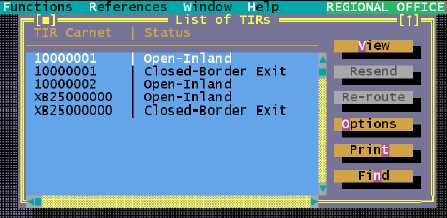
Figure 7.8: ‘Functions’, ‘TIR Carnet’, ‘Print/Query’, ‘List of TIRs’.
Generate Manifest
This option allows you to place a TIR Carnet that has been partially or totally discharged under
normal customs control by generating a manifest with bills of lading representing the discharged
items. You are asked to enter the number of a TIR Carnet and the system then checks if :
· The TIR Carnet has been partially discharged or totally discharged at the current office;
· The TIR Carnet has not already been placed under Customs control.