MODTRS - TRANSIT CONTROLS USING ASYCUDA++
Ó UNCTAD – SITE (V1.15)
7.23
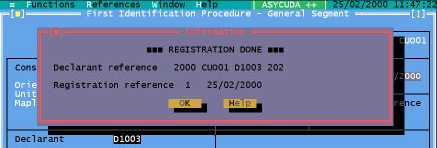
Figure 7.12: ‘Functions’, ‘FIP’, ‘Inland Office’, ‘New’, ‘Capture’, ‘F9 Local menu’, ‘Register’.
Amend Stored
This option allows the user to retrieve a stored FIP by Declarant code and Declarant reference and
amend details on the FIP itself.
Delete Stored
Function not available yet.
Print/Query
View
The View option allows the user to retrieve a FIP by its Declarant reference or its Registration
reference. The FIP can be viewed and the only actions available in the Local Menu of the View
screen are: -
· Local store
· Printout
List of FIPs
The List option displays a screen for you to choose the selection parameters for the required list of
FIPs. You can select a list for a specific Border office, Declarant code and date interval. You must
select the status of the FIPs to be listed - the status can be ‘Stored’, ‘Registered’, ‘Validated’ or
‘Under Customs control’. The list can be sorted by ‘Office of Departure’, ‘Office of Entry’, ‘Declarant
reference’, ‘Registration Reference’ or ‘Validation reference number’.
From the produced list of FIPs, you can carry out 2 operations:
View - Retrieve a FIP from the list for viewing only.
Resend - Registered FIPs at an Inland Office can be resent to the Border Office via the A++ Gate.
Validated FIPs at a Border Office can be resent to the Inland Office via the A++ Gate.
Server Report
A server report for FIPs, is available under ‘Inland Office’, Print Query’, ‘Validated FIPs - Date to
Date’.
This report gives you a list of validated FIPs for a particular date interval.
Border Office (MODTRS)
The Border Office deals with FIPs that have been created and registered at an Inland Office and
sent to the Border Office waiting for the arrival of the goods. When the goods arrive, the FIP can be
validated and data agent sent automatically sent to the Inland Office via the A++ Gate. The
following options are available: