MODTRS - TRANSIT CONTROLS USING ASYCUDA++
Ó UNCTAD – SITE (V1.15)
7.29
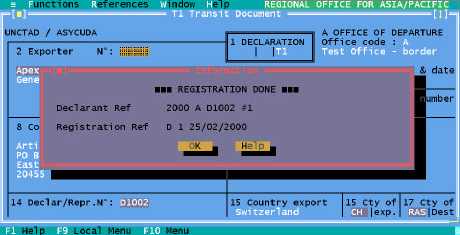
Figure 7.14: ‘Functions’, ‘T1’, ‘Departure office’, ‘Creation’, ‘Capture’ ‘F9 Local menu’, ‘Action’, ‘Registration’.
Generate from SAD (only in MODTRS)
This option will first ask you to enter the Declarant reference, Customs reference or Assessment
reference. In order to generate a T1 from the SAD, the SAD should be: -
· An export SAD;
· Assessed; and
· Not yet written-off.
If these criteria are completed then a T1 will be generated on screen but the SAD is not retrieved).
The operations that can be performed on this generated T1 are the same as on a local file,
EXCEPT that ‘Server Store’ is not permitted. Note: the Declarant from the SAD is not displayed on
the T1.
Amend Stored
This allows the user to retrieve a stored T1 by its Declarant code and Declarant Reference and
amend it. ‘Local Menu’, ‘Action’ operations available with a new T1 are available from this
‘Amend’ option too.
‘Amend Stored’ in MODBRK allows Declarants to retrieve only their own T1s.
Delete Stored
Function not available yet.
Cancellation
You can cancel a T1 that has been registered at the Office of Departure but has not yet been
validated at the Office of Destination. The system will ask you for the T1 reference by Declarant
reference or Registration Reference. If the T1 is registered and not validated, the system will cancel
the T1. A data agent message is sent via the A++ Gate to the Office of Destination to cancel the
T1.
The T1 can no longer be validated at the Office of Destination. At both Office of Departure and
Office of Destination the T1 will take on the status ‘CANCELLED’. Through the menu option ‘T1’,
‘Print/Query’, ‘List’, you can see the list of ‘CANCELLED T1s’ .
Office of Destination
The Office of Destination is concerned with T1s that have been created and registered at an Office
of Departure and have been sent to the Office of Destination along with the goods.