MODSYSCF - CUSTOMS OFFICE CONFIGURATION
Ó UNCTAD - SITE (V1.15)
9.10
ASYCUDA Group Access
Under ASYCUDA++, the individual Users are assigned to Offices and GROUPS, that is, to defined
locations and areas of work. Examples are the Cashier section of an airport office, or Declaration
processing at a Seaport.
This allows for the normal situation where several people working in the same Customs office need
access to the same areas of the system. The GROUP is allocated access to an area of the system
that is required for performance of work, and denied access to all other areas of the system.
This process is one of authorising GROUP access to the required Menus and Options. Any areas
that are not specifically allowed are not available to members of that group. These ‘prohibited’
functional options of ASYCUDA++ will continue to show on screen on the Module menus but will be
grey, not black. This means that these system options cannot be accessed or activated by that
group member.
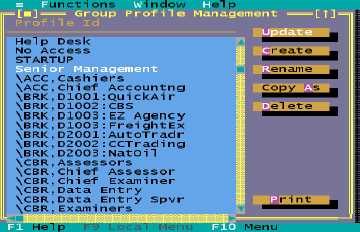
When the Group Profiles option is selected, the Group Profile management screen is displayed:
Fig 9.3 MODSYSCF : Security Group profiles
The management screen allows groups to be ‘created’, ‘updated’, ‘copied’, ‘renamed’, ‘deleted’ and
‘printed’. The format of the name can be used to limit access to certain modules and is also used to
limit Declarants using MODBRK to access to only their own declarations and prints.
The syntax for limiting a group to a specific module is:
\”MODULE”:Group Name
The syntax for limiting a Declarant to MODBRK and only his own Declarations is:
\BRK,”Declarant Code”:Group Name
To limit a group to a particular module, use the name of the module excluding the MOD. This must
be in upper case. For an example of the use of the name format, see the screen above.
Editing the group profile is quite simple.